Overview
Noodle can use LDAP with AD to authenticate as well as import users and groups.
Noodle Prerequisites
- Before enabling LDAP in Noodle ensure your license key will accommodate the total number of users( local and from the AD group).
- Using SSL may require a client certificate installed on the Noodle server.
Configuration
The AD settings are in System Tools > Settings > Single Sign-On.
- Toggle Enabled to Yes
- Enter the Name or IP address of your DC
- Make a new user in AD in the Users Container with rights to search other users, and enter the display name and primary FQDN in the Noodle Administrative field, password in the password field.
- yes the display name, not the user name.
- Add the service user account to the "Read-only Domain Controllers" security group if read only is enabled in the Noodle AD settings.
- Make a new Security Group in AD, add some users and groups to it, and tell Noodle it's name.
- Tell Noodle the primary Domain of the users in the security group
- Save
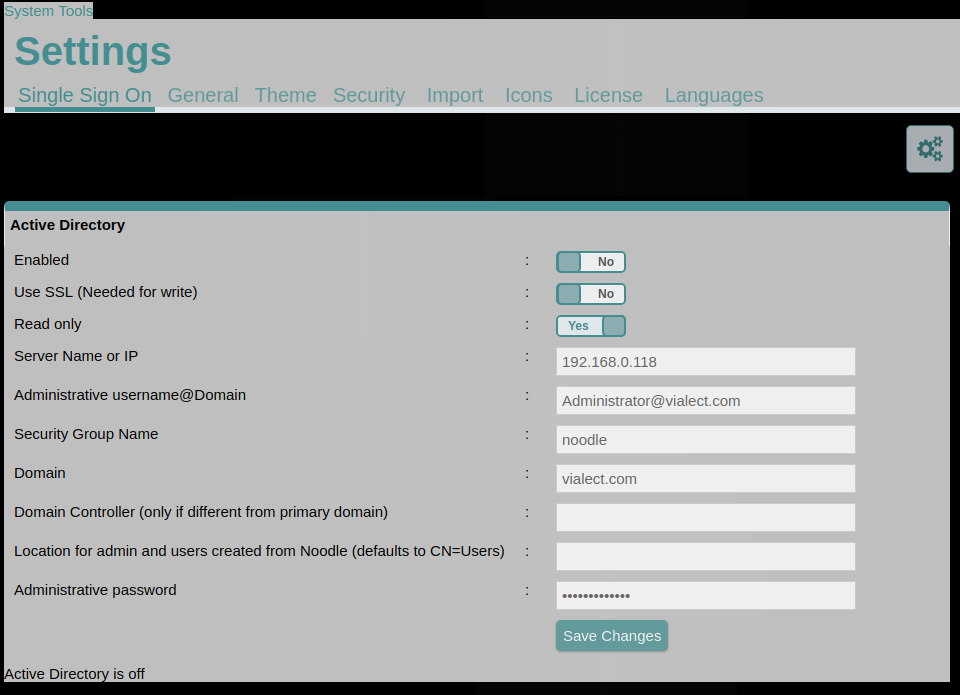 You should see “Active Directory is synchronized” display at the bottom of the page after the first sync is complete.
Additional Information
- Required synchronizing fields: firstname, lastname, email
- Synchronizing fields: title, phone1, phone2, mobile, address, city, state, country, zip, manager, note
- Extra synchronizing fields : UPN, locked, change password on login, expiry, group id, modifyTimeStamp, distinguishedName
- Other synchronizing fields can be added in "System Tools > People > Administration > Settings > User Fields" (EG: add "CN=sAMAccountName" to enable 1996 authentication)
- Noodle imports ONLY users and groups that are directly members to the “Group Name” specified in Noodle (users from sub groups will not be imported) and users must have a matching primary "domain" specified in Noodle.
- AD changes are reflected in Noodle every 10 minutes by default.
- Authentication requests are forwarded from Noodle to Active Directory in real time.
- Multiple DCs can be used by separating the settings with commas.
- The same number of commas should exist in all settings (think spreadsheet).
- Backup DCs can be used by separating the IPs with semicolons.
- When configuring AD from the cloud, port forwarding (or firewall rules and routes) must be configured. Please review the Microsoft documentation:
- See also the AD Troubleshooting Guide.